Now available for beta testers זמין עכשיו בגרסת בטא לבדיקה

AI-powered editing
for Torah texts
הגהה חכמה
לטקסטים תורניים

Professional proofreading, source verification, and intelligent search — seamlessly integrated into Microsoft Word. הגהה מקצועית, אימות מראי מקומות וחיפוש מקורות חכם — הכל משולב בטבעיות ב-Microsoft Word.

Download for Windowsהורדה ל-Windows See featuresתכונות
Mugah proofreading in action inside Microsoft Word
AI Proofreadingהגהה חכמה

Intelligent editing that understands Torah texts הגהה מתקדמת שמבינה טקסטים תורניים

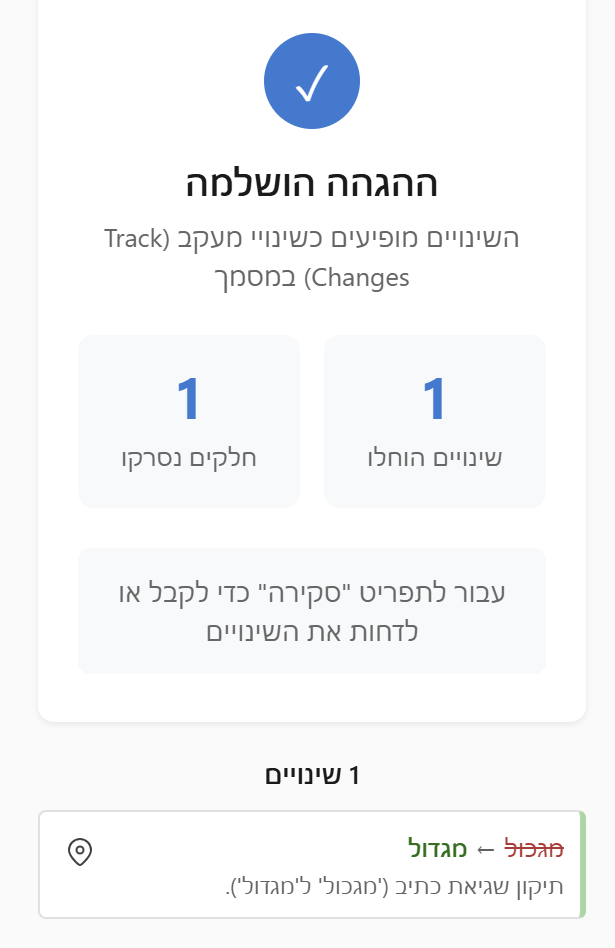
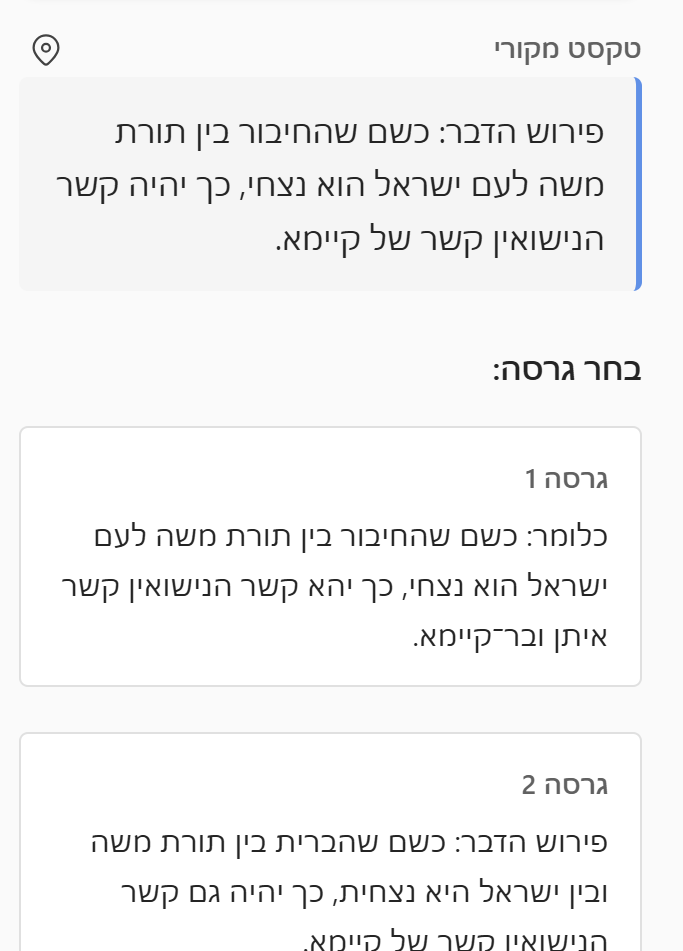
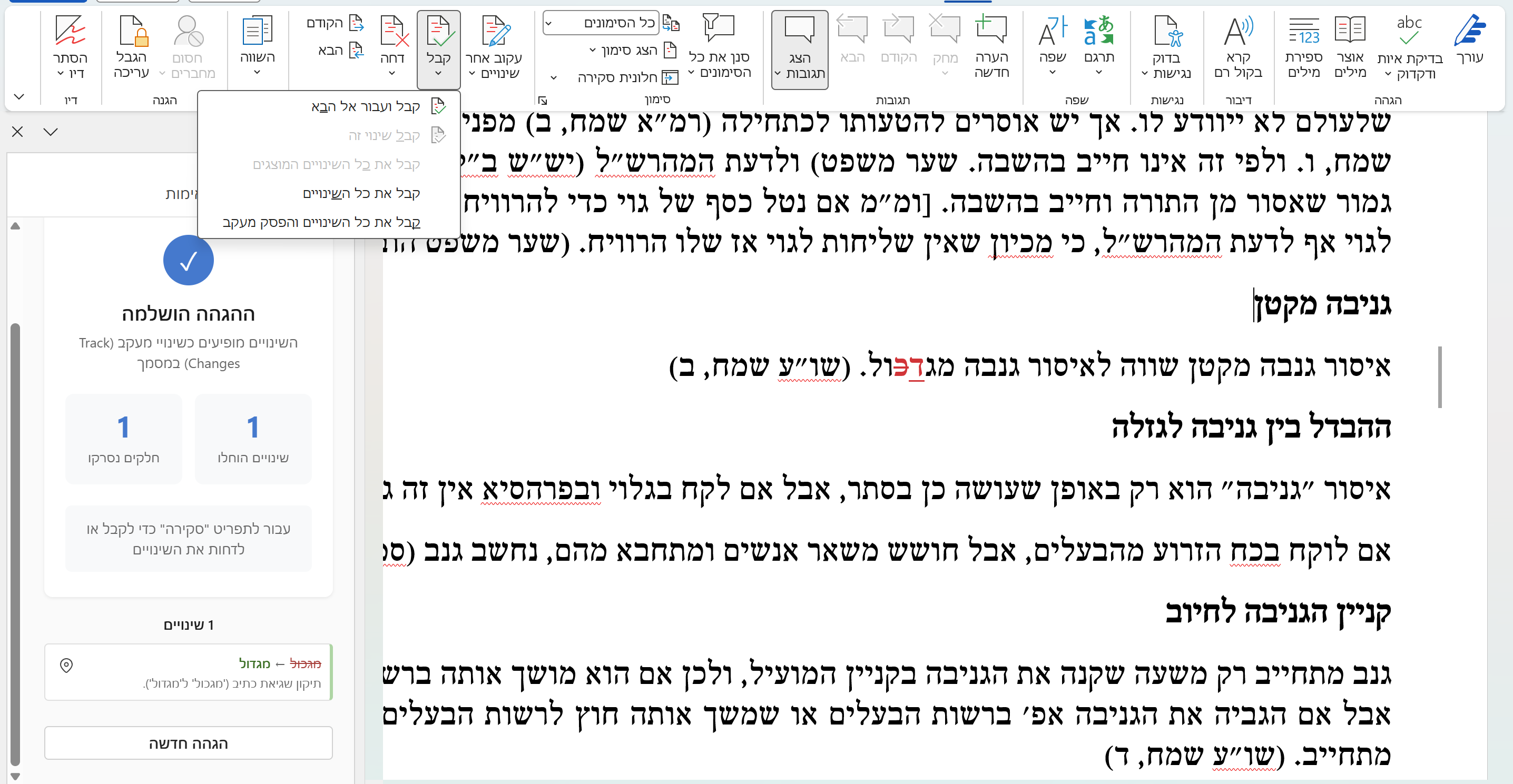
Analyze paragraphs, footnotes, and endnotes with AI that's tuned for Hebrew Torah scholarship. Every suggestion appears as a Word track change — accept or reject with full control. ניתוח פסקאות, הערות שוליים והערות סיום באמצעות מנוע חכם המותאם לעולם הכתיבה התורנית. כל הצעת תיקון מופיעה כמעקב שינויים ב-Word — קבלו או דחו כל תיקון לפי שיקול דעתכם.

  • Customizable editing rules per sectionכללי הגהה גמישים הניתנים להגדרה והתאמה אישית
  • Preserves formatting and document structureשמירה על עיצוב ומבנה המסמך
  • Handles complex Hebrew typographyתמיכה בטיפוגרפיה עברית מורכבת
Proofreading interface with track changes
Source Verificationאימות מראי מקומות

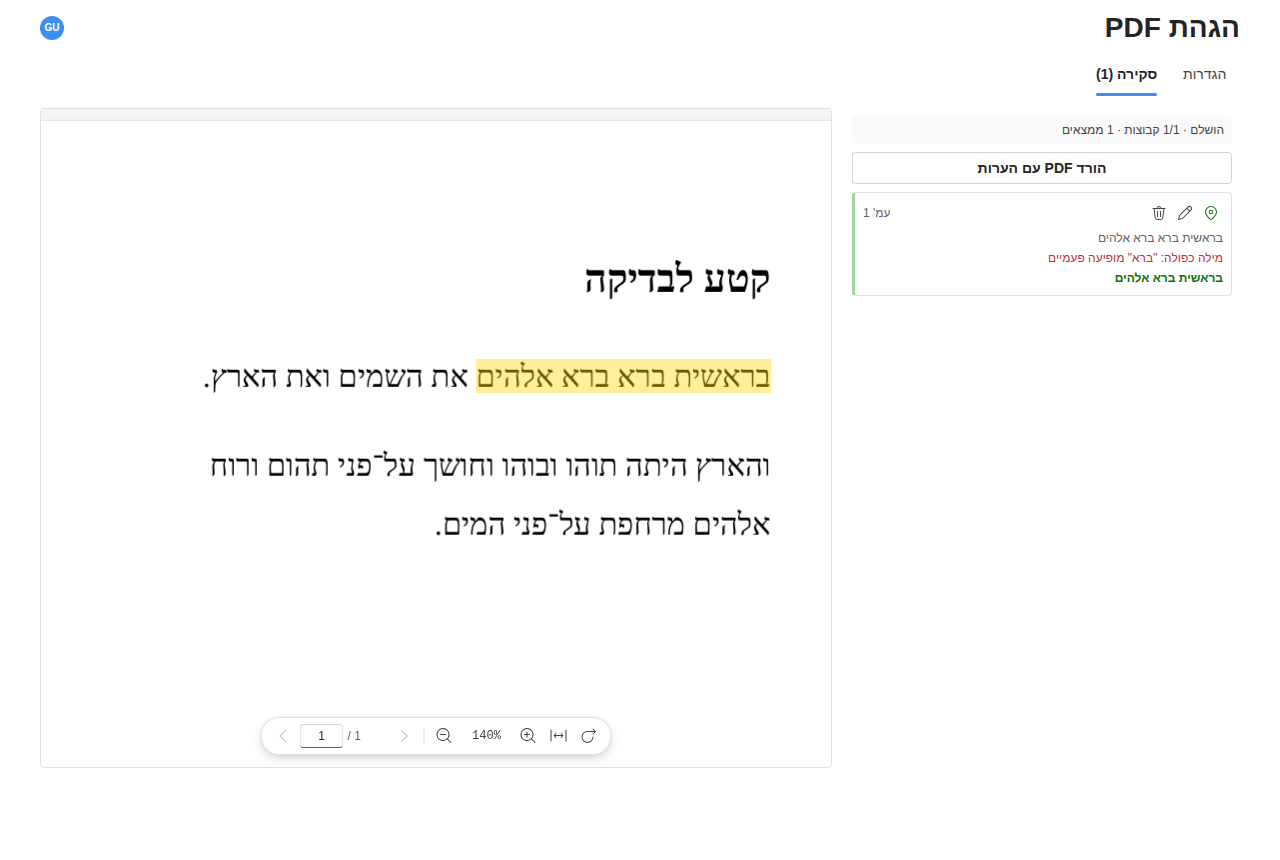
Validate every citation automatically אימות אוטומטי של כל מראה מקום

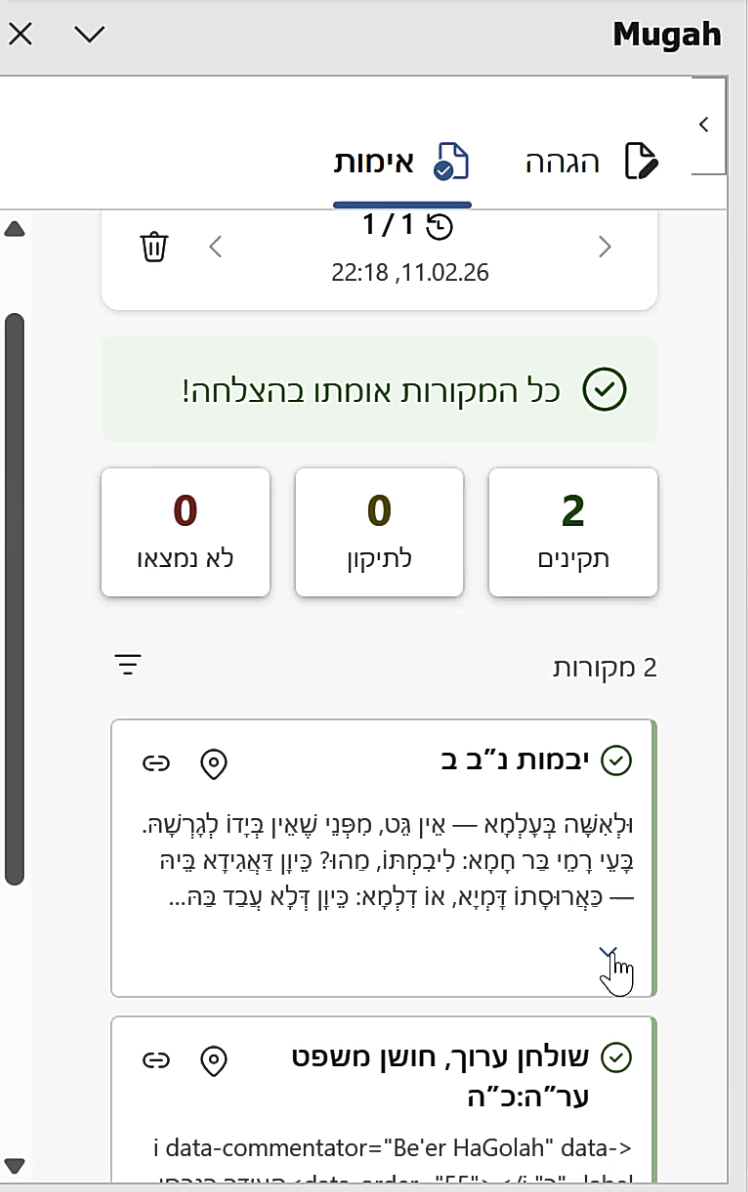
Cross-references your footnotes and endnotes against the Sefaria database. Instantly see which sources check out and which need attention. הצלבת ציוני מראי מקומות מול מאגר תורני. גלו מיד אילו מקורות מדויקים ואילו טעונים בדיקה נוספת.

  • Validates Torah references against Sefariaאימות מראי מקומות מול מאגר ספריא
  • Adds review comments for issuesהוספת הערות ביקורת במקומות שדורשים תשומת לב
  • Link to the original textקישור פעיל לטקסט המקור
Source verification panel showing validated citations
Torah Searchחיפוש מקורות

Find the right source in seconds מציאת מקורות נוספים — תוך שניות

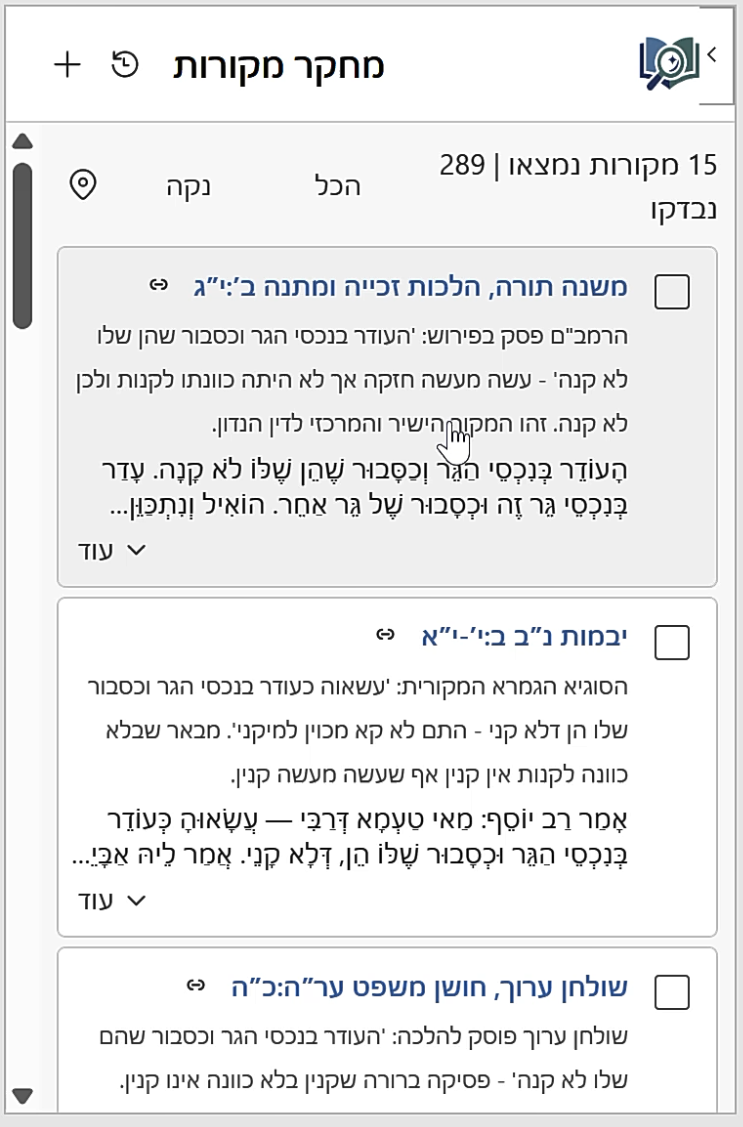
Describe what you're looking for in natural language and let AI search across Torah, Talmud, Midrash, and more. Then use Smart Addition to weave sources into your document intelligently. תארו בשפה חופשית את מה שאתם מחפשים, והמערכת תסרוק עבורכם את התנ"ך, ש"ס ומפרשיו, ספרות הלכה ושו"ת, מדרשים, חסידות, מוסר ועוד. השתמשו בהוספה החכמה כדי לשלב מקורות במסמך בדיוק במקום הנכון ובנוסח המתאים.

  • Natural language search powered by AIחיפוש חכם בשפה טבעית
  • Full text from the Sefaria libraryטקסט מלא מתוך מאגר ספריא
  • Insert as footnotes, endnotes, or inlineהוספה כהערת שוליים, הערת סיום, או בגוף הטקסט
  • Smart Addition — AI places citations at the right spot in your text, preserving existing notesהוספה חכמה — המערכת משלבת את המקורות החדשים בדיוק במקום הנכון, תוך שמירה על תחביר וסגנון מתאימים
Torah search results with source text
Bibliography Indexמפתח מקורות

Generate a complete bibliography automatically יצירת מפתח ספרים אוטומטית

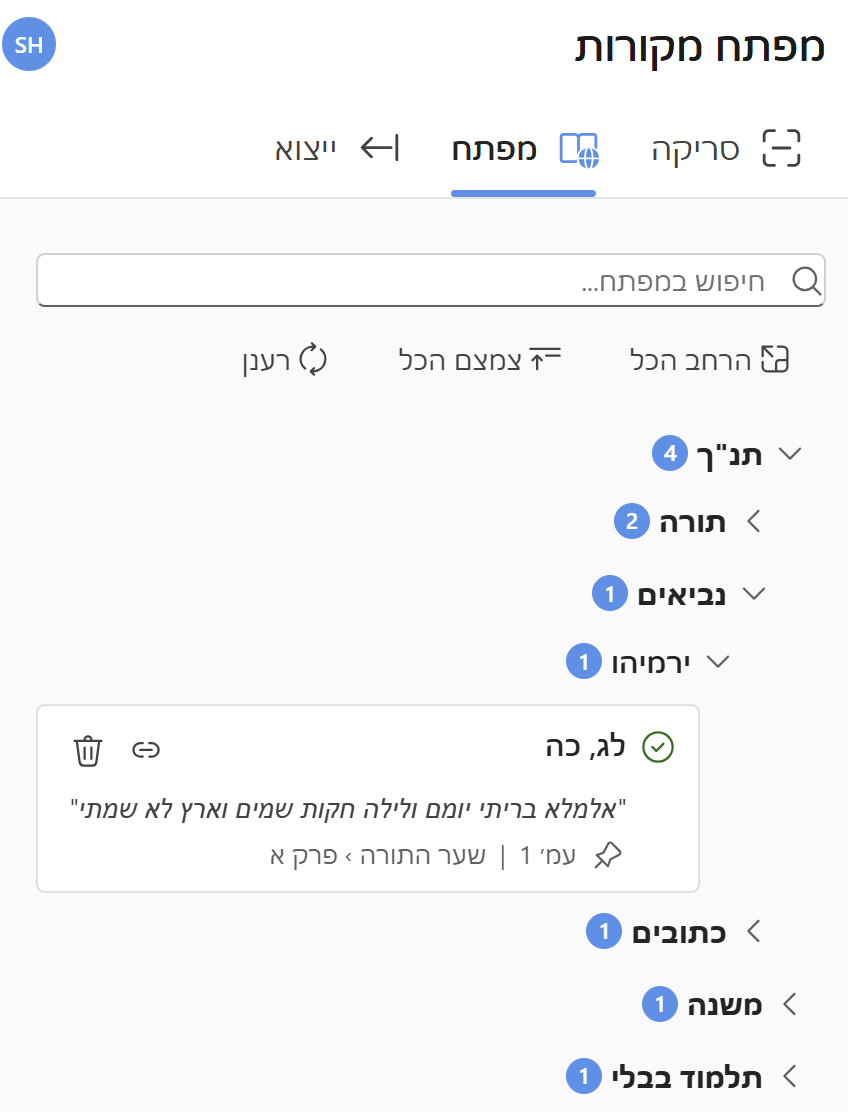
Scan your entire document to extract every Torah citation from footnotes and endnotes. Mugah builds a structured, hierarchical bibliography index — organized by source — ready to export or review. סריקת המסמך כולו לאיתור כל ציוני המקורות. המערכת בונה מפתח מקורות מובנה והיררכי — מסודר לפי ספר ומקור — מוכן לייצוא או לעיון.

  • Hierarchical tree view organized by sourceתצוגת עץ היררכית מאורגנת לפי מקור
  • Shows exact citations from the original sourceציטוטים מדוייקים מהמקור
  • Easily edit or fix citation issuesעריכה קלה ונוחה של ציוני המקורות והציטוטים
  • Export to clipboard or insert into documentהעתקה ללוח או הוספה ישירה למסמך
Bibliography index with hierarchical source tree

Built for serious Torah scholarship נבנה עבור עולם העריכה התורני

Every detail is designed for the unique demands of Hebrew Torah document editing. כל פרט עוצב בקפידה עבור הצרכים הייחודיים של הגהת כתבי קודש בעברית.

Format Preservationשמירת עיצוב

Maintains your document formatting while applying corrections. Works with complex Hebrew typography and layouts. שמירה על עיצוב המסמך תוך ביצוע תיקונים. תמיכה מלאה בטיפוגרפיה ופריסות עבריות מורכבות.

Track Changesמעקב שינויים

Every edit appears as a Word track change, giving you full control to accept or reject individual suggestions. כל תיקון מופיע כמעקב שינויים ב-Word, ומעניק לכם שליטה מלאה לקבל או לדחות כל הצעה בנפרד.

Custom Rulesכללים מותאמים אישית

Configure general and section-specific editing rules. Adapt the AI to your style guide and preferences. הגדירו כללי הגהה משלכם. שימרו מספר סטים של הנחיות לשימושים שונים. התאימו את המערכת לסגנון ולהעדפות שלכם ולטקסט עליו אתם עובדים.

Get started in minutes מתחילים תוך דקות

E . התקנה פשוטה וקלה ללא סיבוכים

01

Install the add-inהתקינו את התוסף

Download the installer and run it, then enable the addin in MS-Word.הריצו את תוכנית ההתקנה ולאחר מכןהפעילו את התוסף מתוך Word.

02

Open your documentפתחו את המסמך

Works with any Word document containing Hebrew Torah text.עובד עם כל מסמך Word שמכיל טקסט תורני.

03

Run analysisהריצו ניתוח

Select text or analyze the entire document with one click.סמנו טקסט או נתחו את המסמך כולו בלחיצה אחת.

04

Review & acceptבדקו ואשרו

Review suggestions as track changes and accept what works.עברו על ההצעות כמעקב שינויים וקבלו את מה שמתאים.

Start editing smarter התחילו להגיה בצורה חכמה

Join scholars and editors who use Mugah to improve their Torah documents. Download the installer and get started in minutes. הצטרפו לעורכים ולמגיהים שכבר משתמשים במוגה לשיפור כתבי הקודש שלהם. הורידו את תוכנית ההתקנה והתחילו תוך דקות.

Requires Windows 10+ and Microsoft Word 2019 or later דורש Windows 10 ומעלה ו-Microsoft Word 2019 ואילך

Frequently asked questions שאלות ותשובות

Everything you need to know about Mugah. כל מה שצריך לדעת על מוגה.

Download the installer from this page, run it on your Windows computer, then enable the Mugah add-in from the Microsoft Word ribbon. You'll need Windows 10 or later and Microsoft Word 2019 or later. Once installed, open any Word document with Hebrew Torah text and click the Mugah tab to start. הורידו את תוכנית ההתקנה מדף זה, הריצו אותה במחשב ה-Windows שלכם, ולאחר מכן הפעילו את תוסף מוגה מסרגל הכלים של Word. דרוש Windows 10 ומעלה ו-Microsoft Word 2019 ואילך. לאחר ההתקנה, פתחו כל מסמך Word עם טקסט תורני בעברית ולחצו על לשונית מוגה כדי להתחיל.
Mugah offers three plans: Free (50 credits/month, basic proofreading and search), Pro at ₪99/month or ₪950/year (3,000 credits/month, advanced proofreading, document review, and priority support), and Max at ₪299/month or ₪2,870/year (10,000 credits/month, early access to new features, and dedicated support). Annual plans offer a 20% discount. מוגה מציעה שלושה מסלולים: חינם (50 קרדיטים לחודש, הגהה בסיסית וחיפוש מקורות), מקצועי ב-₪99 לחודש או ₪950 לשנה (3,000 קרדיטים לחודש, הגהה מתקדמת, ביקורת מסמכים ותמיכה מועדפת), ומקסימום ב-₪299 לחודש או ₪2,870 לשנה (10,000 קרדיטים לחודש, גישה מוקדמת לתכונות חדשות ותמיכה ייעודית). מסלולים שנתיים כוללים הנחה של 20%.
Every action in Mugah consumes credits from your monthly balance. The number of credits per operation varies significantly depending on the length and complexity of the text you submit. For example, proofreading a short paragraph may cost just 2–3 credits, while proofreading a long, complex section with many footnotes could cost 20+ credits. Source verification of a single citation is cheaper than verifying an entire page of references. The base cost also differs by feature type — proofreading, source search, source verification, document review, bibliography generation, and source integration each have different underlying AI costs. As a rough guide, typical single operations range from about 3 to 10 credits, but longer or more complex requests will cost proportionally more. You can always check your remaining credit balance in the add-in. Credits reset at the beginning of each billing cycle and unused credits do not carry over to the next month. כל פעולה במוגה צורכת קרדיטים מהמאזן החודשי שלכם. מספר הקרדיטים לפעולה משתנה באופן משמעותי בהתאם לאורך ומורכבות הטקסט שאתם שולחים. לדוגמה, הגהת פסקה קצרה עשויה לעלות רק 2–3 קרדיטים, בעוד שהגהת קטע ארוך ומורכב עם הערות שוליים רבות עשויה לעלות 20 קרדיטים ומעלה. אימות מראה מקום בודד זול יותר מאימות עמוד שלם של הפניות. העלות הבסיסית שונה גם לפי סוג הפעולה — הגהה, חיפוש מקורות, אימות מקורות, ביקורת מסמכים, יצירת מפתח מקורות ושילוב מקורות — לכל אחד עלות שונה. כהנחיה כללית, פעולות בודדות טיפוסיות עולות בין 3 ל-10 קרדיטים בערך, אך בקשות ארוכות או מורכבות יותר יעלו יותר באופן יחסי. תוכלו תמיד לבדוק את יתרת הקרדיטים שלכם בתוסף. הקרדיטים מתאפסים בתחילת כל מחזור חיוב וקרדיטים שלא נוצלו אינם עוברים לחודש הבא.
Billing is processed securely through Paddle. You'll be charged at the beginning of each billing period (monthly or annually). You can cancel your subscription at any time from the account settings. Upon cancellation, you retain access to your plan's features until the end of the current billing period, after which your account reverts to the Free plan. החיוב מתבצע באופן מאובטח דרך Paddle. החיוב נעשה בתחילת כל תקופת חיוב (חודשית או שנתית). ניתן לבטל את המנוי בכל עת מהגדרות החשבון. לאחר ביטול, תישמר הגישה לתכונות המסלול עד סוף תקופת החיוב הנוכחית, ולאחריה החשבון יחזור למסלול החינמי.
For proofreading: Write clear editing rules in the settings. Be specific — for example, "use nikud only for biblical quotes" or "prefer Ashkenazi spelling for Yiddish-origin words." You can set different rules for different sections.

For source search: Describe what you're looking for in natural language. Instead of a vague query like "Shabbat," try "sources about the prohibition of carrying in a public domain on Shabbat according to the Rambam." The more context you provide, the better the results.

General tips: Work paragraph by paragraph for proofreading rather than selecting very long sections. Review all AI suggestions carefully — the tool assists, but the final editorial judgment is always yours.
להגהה: כתבו כללי עריכה ברורים בהגדרות. היו ספציפיים — למשל, "ניקוד רק בציטוטים מהתנ"ך" או "איות אשכנזי למילים ממקור יידיש." ניתן להגדיר כללים שונים לחלקים שונים במסמך.

לחיפוש מקורות: תארו את מה שאתם מחפשים בשפה טבעית. במקום חיפוש כללי כמו "שבת," נסו "מקורות על איסור הוצאה מרשות לרשות בשבת לפי הרמב"ם." ככל שתספקו יותר הקשר, כך התוצאות יהיו טובות יותר.

טיפים כלליים: עבדו פסקה-פסקה בהגהה במקום לסמן קטעים ארוכים מאוד. בדקו תמיד את כל הצעות התיקון בקפידה — הכלי מסייע, אך שיקול הדעת העריכתי הסופי הוא תמיד שלכם.
Free: Basic proofreading, source search, and source verification with 50 monthly credits.

Pro: Everything in Free, plus advanced proofreading, document review, bibliography generation, and priority support with 3,000 monthly credits.

Max: Everything in Pro, plus early access to new features, dedicated support, and 10,000 monthly credits.
חינם: הגהה בסיסית, חיפוש מקורות ואימות מקורות עם 50 קרדיטים לחודש.

מקצועי: כל מה שבחינם, בתוספת הגהה מתקדמת, ביקורת מסמכים, יצירת מפתח מקורות ותמיכה מועדפת עם 3,000 קרדיטים לחודש.

מקסימום: כל מה שבמקצועי, בתוספת גישה מוקדמת לתכונות חדשות, תמיכה ייעודית ו-10,000 קרדיטים לחודש.
Yes. Document text is sent to our servers only during active operations (proofreading, search, etc.) and is not stored permanently. We use industry-standard encryption for all data in transit. For full details, see our Privacy Policy. כן. טקסט המסמך נשלח לשרתים שלנו רק במהלך פעולות פעילות (הגהה, חיפוש וכו') ואינו נשמר באופן קבוע. אנו משתמשים בהצפנה תקנית לכל המידע בהעברה. לפרטים המלאים, ראו את מדיניות הפרטיות שלנו.
Contact us anytime at sivan.ratson@gmail.com. We typically respond within 24 hours. Pro and Max subscribers receive priority support. פנו אלינו בכל עת בכתובת sivan.ratson@gmail.com. אנו עונים בדרך כלל תוך 24 שעות. מנויי מסלול מקצועי ומקסימום זוכים לתמיכה מועדפת.

Get in touch צרו קשר

Have a question, feedback, or need help? We'd love to hear from you. יש לכם שאלה, משוב, או צריכים עזרה? נשמח לשמוע מכם.

✉ sivan.ratson@gmail.com